
Why is the bundle discount not applied in the cart?
Overview
XB: Bundles Quantity Breaks applies its discounts with a Shopify discount that runs in the cart and at checkout. If the shopper adds the offer to the cart but the price does not drop, go through these checks.
Checks
1. The app's discount is active
In your Shopify admin, go to Discounts and search for xboost. The automatic discount XBoost Bundle must be Active. If it is not, open the offer and click Test on storefront. If a check about the discount fails, the window offers the fix: Reactive discounts turns the app's discount back on. See How to use Test on storefront function.
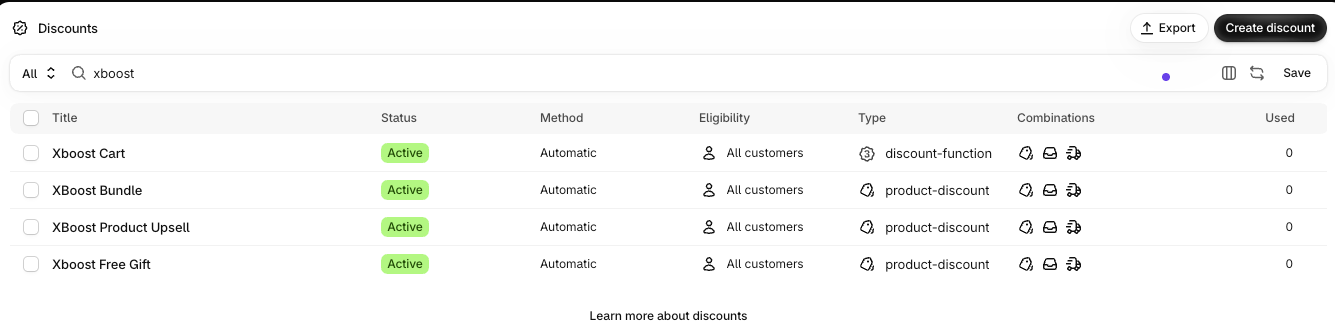
Do not delete or turn off the app's discount in Discounts.
2. You do not have too many active offers
Shopify limits the size of the settings a discount function can read. All your active offers are stored in the app's discount. When there are too many active offers, the settings grow past Shopify's limit, and the discount stops working for every offer.
To fix it, reduce the number of active offers:
- In the app menu, click Offers. Select the offers you do not use and click Deactivate.
- Delete the offers you no longer need.
- Merge offers that use the same settings into one offer. For example, instead of several offers with the same discount for different products, add all the products to one offer.
3. Your store has room for automatic discounts
Shopify allows at most 5 automatic discounts at a time. If your store has reached this limit, the test window shows it. Either free a slot (Manage Auto Discounts) or click Use code discount instead so the app applies a discount code.
4. The cart matches the offer
- Quantity Discounts: the cart must have at least the tier quantity of the same product, for example 2 for "Buy 2". Variants of one product count together.
- Without Allow users to buy extra items, only full multiples of the tier quantity get the tier discount. For example, with a "Buy 3" tier and 7 items in the cart, 6 items get the "Buy 3" discount.
- If two tiers have the same quantity, only the first tier's discount applies.
- Fixed bundle and AI Frequently Bought Together: the cart must have the bundle products. On AI Frequently Bought Together, check Minimum number of products required to apply the discount.
- Mix & match: the cart must reach the tier quantity across the offer products.
- Upsells and free gifts in a tier are discounted only when that tier applies.
5. Two offers target the same product
Each cart item gets the discount of one offer only. Items added through an offer widget use that offer first. Check that another active offer does not cover the same product.
6. Other discounts
A discount code the shopper enters, or another app's discount, can stop the offer discount when the two discounts do not combine. In your Shopify admin, go to Discounts, open the other discount and check its Combinations.
If the discount still does not apply, contact us through the in-app chat.