
Why are the Buy it now and express checkout buttons hidden?
Overview
On a product page with a Quantity Discounts offer, your theme's Buy it now and express checkout buttons, such as Shop Pay, PayPal, Apple Pay or Google Pay, disappear when the shopper picks different variants in one tier. They show again as soon as all items in the tier use the same variant.
This is expected. It prevents shoppers from checking out with the wrong items or without the bundle discount.
Why the app hides them
A tier with different variants, for example 1 Red and 1 Blue, needs several cart lines and the bundle discount. The Add to cart button can do that because XB: Bundles Quantity Breaks sends the selected variants and quantities with it.
The Buy it now and express checkout buttons are controlled by Shopify and the payment providers. They skip the cart and go straight to checkout with a single variant, and no app can change what they add. So they cannot add the different variants or apply the bundle discount. To avoid a wrong order, the app hides these buttons while the tier has different variants.
When the buttons show
| Shopper's selection in the tier | Buy it now and express checkout buttons |
|---|---|
| All items use the same variant, for example 2 Red | Shown |
| Items use different variants, for example 1 Red and 1 Blue | Hidden |
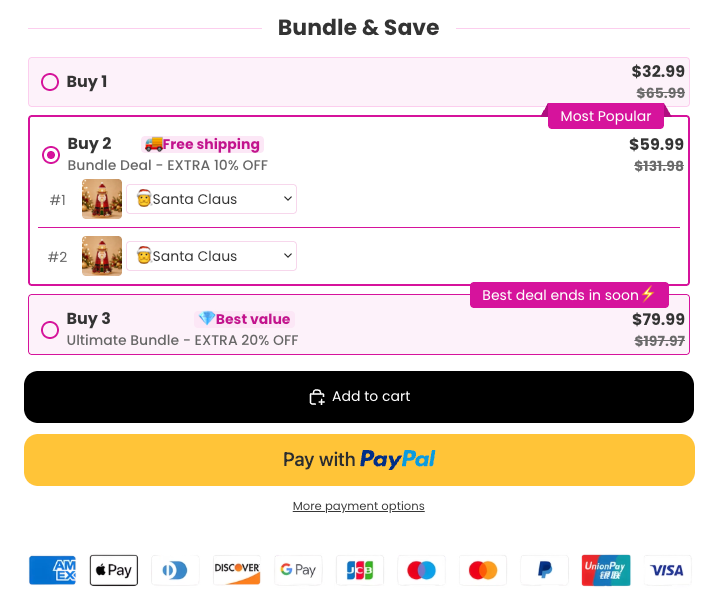
Both items of Buy 2 use the same variant, Santa Claus. Pay with PayPal and More payment options show under Add to cart:
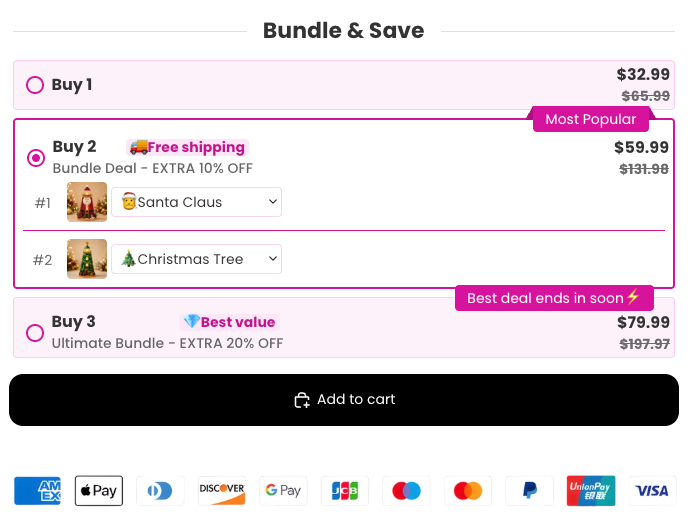
The second item is changed to Christmas Tree. Only Add to cart is left:
What shoppers can do
- Click Add to cart, then check out from the cart. The cart gets every variant and the bundle discount.
- Or pick the same variant for every item in the tier. The buttons show again.
Keep the buttons visible
If you prefer to always show the Buy it now and express checkout buttons, let shoppers pick only one variant per tier:
- Open the Quantity Discounts offer and go to the Appearance step.
- Under Variant, clear Let customers choose different variants for each item.
- Click Save.