
How to hide the sample bundle offer on my store
Overview
XB: Bundles Quantity Breaks can show a sample offer (with sample products and the name "Sample Offer") so you can see how a widget looks. The sample shows on product pages that have no real offer of that type. If you see a sample bundle on your store that you did not create, turn off the example settings in your theme.
There are two places to check: the app embed and the app blocks.
Steps
1. Turn off the examples in the app embed
- In your Shopify admin, go to Online Store > Themes and click Customize.
- Open App embeds in the left sidebar and expand Xboost Core Script (listed under Xboost Bundle).
- Turn off every Show example for … option: Show example for Quantity breaks, Addon, Buy X get Y, Fixed Bundle, FBT, Recommendation and Mix and Match.
- Click Save.
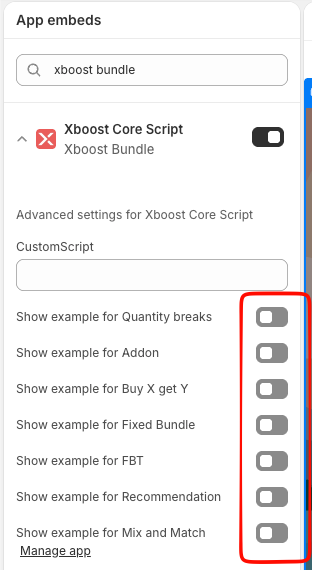
These options are off by default.
2. Turn off the example in each app block
If you added an app block of the app to a page, for example Quantity Breaks or FBT, the block has its own Show example setting. It is on by default.
- In the theme editor, open the page with the block, for example your product template.
- Click the app block in the left sidebar.
- Clear Show example.
- Click Save.
Do this for each Xboost Bundle app block in your theme.