
Getting started with XB: AI Cart Upsell Cart Drawer
Overview
XB: AI Cart Upsell Cart Drawer (shown as XB: AI Cart Upsell in your Shopify admin) replaces your theme's cart with a cart drawer that slides in from the side. The drawer can show a rewards bar, upsell products, add-ons, shipping protection, a discount code field and more. This guide turns on the app embed and the cart drawer.
Before you start
- Install XB: AI Cart Upsell Cart Drawer from the Shopify App Store.
- The cart drawer works only while your app plan is active.
Steps
1. Open the app dashboard
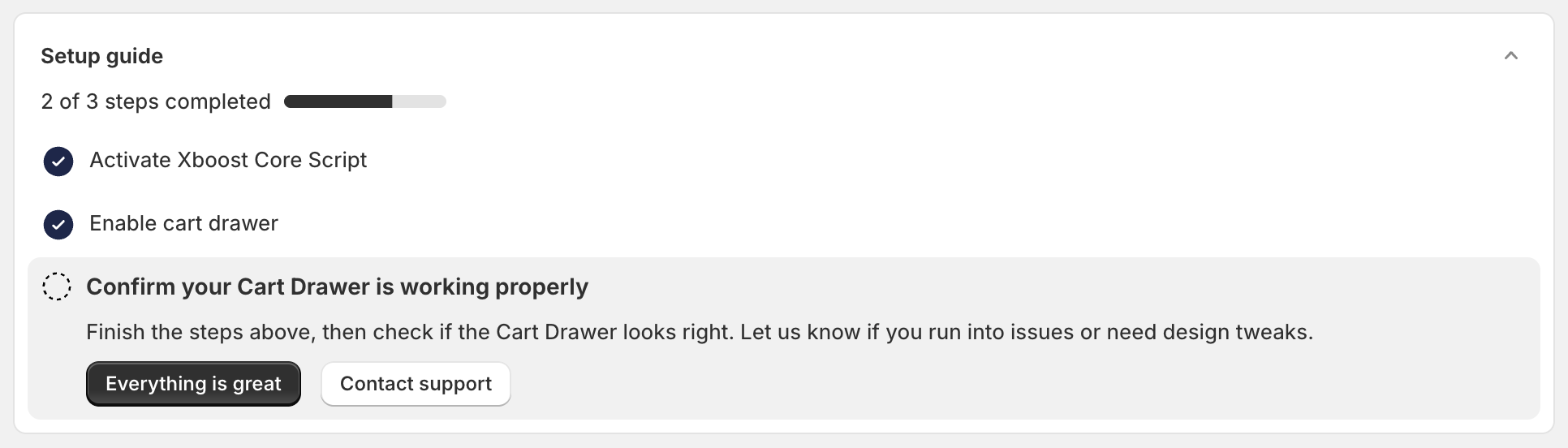
In your Shopify admin, go to Apps and open XB: AI Cart Upsell. The dashboard opens with the Setup guide:
- Activate Xboost Core Script turns on the app embed.
- Enable cart drawer turns on the drawer.
- Confirm your Cart Drawer is working properly asks you to check the drawer on your store.
2. Turn on the app embed
Find the App Status card on the dashboard.
- Active with the message "Xboost app embedded successfully in the online store." means the app embed is on. Go to step 3.
- If the status is not Active, click the button on the card to open the theme editor.

In the theme editor:
- Open App embeds in the left sidebar.
- Turn on XB: Sticky Cart Upsell (listed under XB: AI Cart Upsell).
- Click Save.
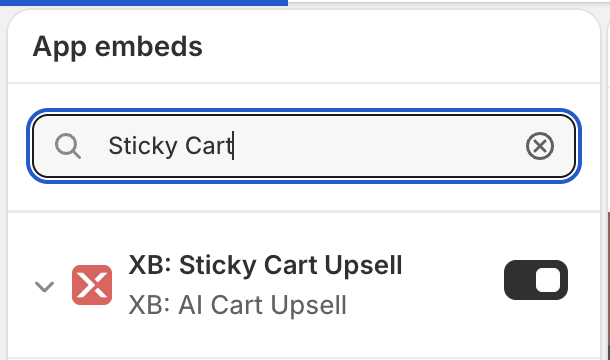
Other XBoost apps have their own app embed, some with a similar name. Make sure you turn on the one under XB: AI Cart Upsell.
3. Turn on the cart drawer
- Click Cart Drawer in the app menu.
- At the top of the page, turn on Cart is active.
If you see Action required with "Subscribe to a plan to activate this feature.", click Choose a plan first. The drawer does not show without an active plan.
4. Check your store
Open your store, add a product to the cart or click the cart icon. The cart drawer slides in. On the dashboard, click Everything is great if it looks right, or Contact support if you need help.