
How to add a countdown announcement to the cart
Overview
The announcement is a colored bar at the top of the cart drawer, for example "Your products are reserved for 04:30 minutes!". It can include a countdown to give shoppers a reason to check out now.
Steps
1. Turn on the announcement
- Click Cart Drawer in the app menu.
- Click Body, then Announcement.
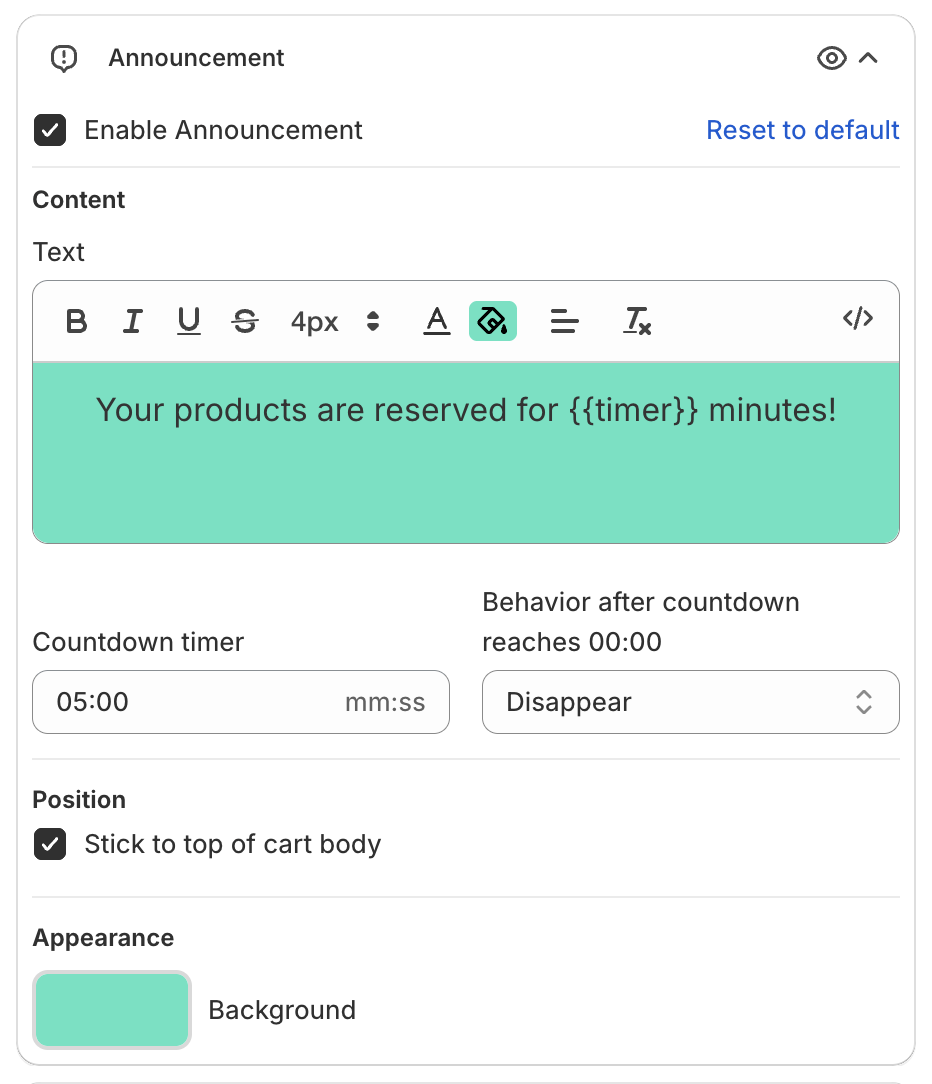
- Tick Enable Announcement.
2. Write the text
In Text, type the message. Put {{timer}} where the countdown should show, for example "Your products are reserved for {{timer}} minutes!". The editor toolbar sets bold, italic, size and color.
3. Set the countdown
- Countdown timer: the start value in mm:ss, for example 05:00.
- Behavior after countdown reaches 00:00: what the announcement does when the countdown ends, for example Disappear.
4. Choose the position and color
- Position: tick Stick to top of cart body to keep the announcement at the very top of the cart, above the other parts of the body.
- Appearance > Background: the bar color.
5. Save
Click Save in the bar at the top of the page. The preview shows the bar:
