
Mix & Match discount type
Overview
XB: Bundles Quantity Breaks allows you to enable discount when creating the offer. We’ve provided mix & match discount type for a mix & match offer.
Mix & Match discount will be applied if the customer purchases the number of the products (can be combination of different products in one order) met the quantity of the tiers that you've configured previously. We've set up default 3 tiers for you: Buy 1, Buy 2+ and Buy 3+. You can configure the number of tiers and tier information as you wish.
User Guide
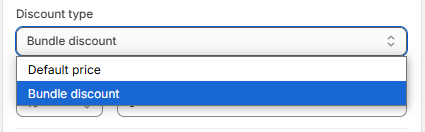
1. Discount types
- Default price: The price is the default price. There is no discount for the tier.
- Bundle discount: The customer will buy the tier with a discount applied to each item. Example: Buy 3 items and receive a 20% discount.
2. Configure tiers
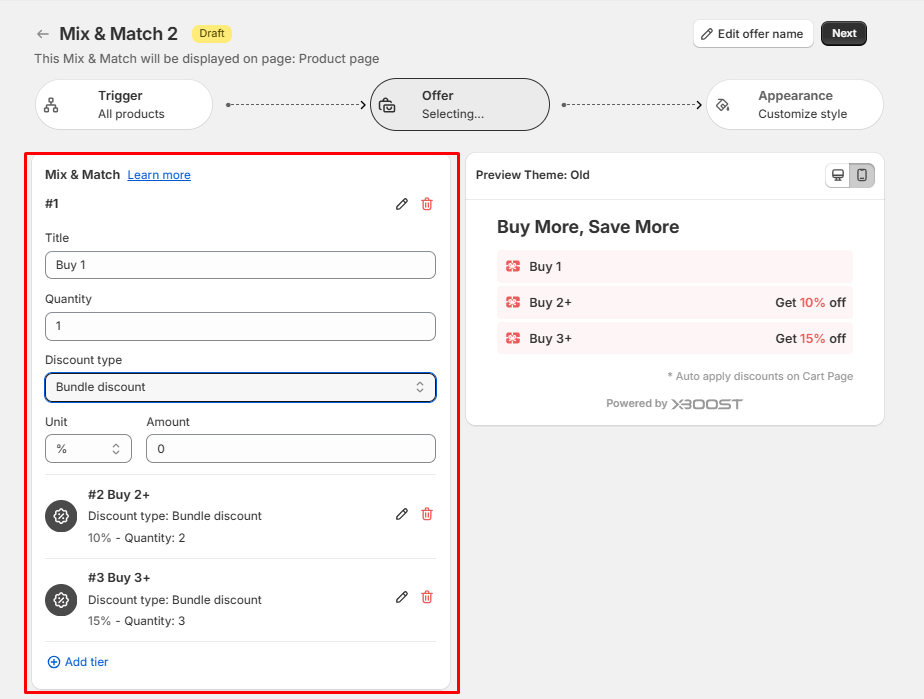
Click on the tier to configure your tier.
- Title: The title of the tier.
- Quantity: The discount will be applied if the number of products is met. The products can be combination of different products in one order.
- Discount type: Select discount type for the tier.
- Unit and Amount: Unit and amount of discount will be applied if customer selects this option.
3. Add or delete tiers
- Click delete icon to delete a tier, Click Add tier to add a new tier if you needed.
- Click Save to finalize your changes.