
How do I change the price format?
Overview
XB: AI Product Upsell & Addons shows prices in your store's currency format, the same format your theme uses. This applies to the prices in product upsell and add-on offers. The app has no price format setting.
To show prices another way, for example $10 instead of $10.00, change the currency format of your store in Shopify. The app then uses the new format.
Steps
- From your Shopify admin, go to Settings > General.
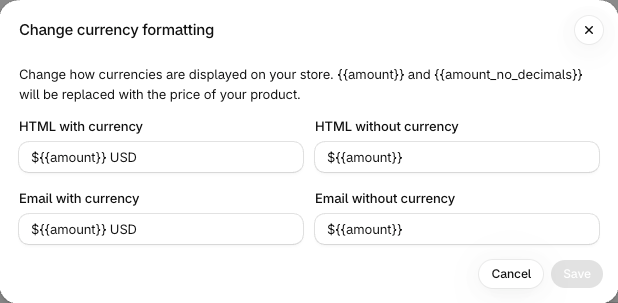
- In Store defaults, click the three-dot menu next to Currency display, then click Change currency formatting.
- In HTML with currency and HTML without currency, change the format. For example, replace
{{amount}}with{{amount_no_decimals}}to hide the decimals. Email with currency and Email without currency are only for email notifications. - Click Save.
- Reload a page of your store to see the new format.
For all format options, see Currency formatting in the Shopify Help Center.
Good to know
- You can change the format of your store currency only. If you sell in other currencies with Shopify Markets, Shopify sets the format of those currencies.