
Why does my theme's cart drawer still show?
Overview
You turned on XB: AI Cart Upsell Cart Drawer, but your theme's own cart drawer still opens, alone or together with the XBoost cart drawer.
Why it happens
Many themes have their own cart drawer. When Cart type in the theme settings is Drawer, the theme opens its drawer each time a shopper clicks the cart icon or adds a product to the cart. The XBoost cart drawer opens on the same actions, so the theme's drawer can still show.
When Cart type is Page, the theme does not open its own drawer. Its cart icon links to the cart page, and the XBoost cart drawer opens instead.
Fix: Set the theme's cart type to Page
- In your Shopify admin, go to Online Store > Themes and click Customize on your theme.
- Click the Theme settings icon (the gear) in the left toolbar.
- Open Cart.
- Under Cart type, select Page.
- Click Save.
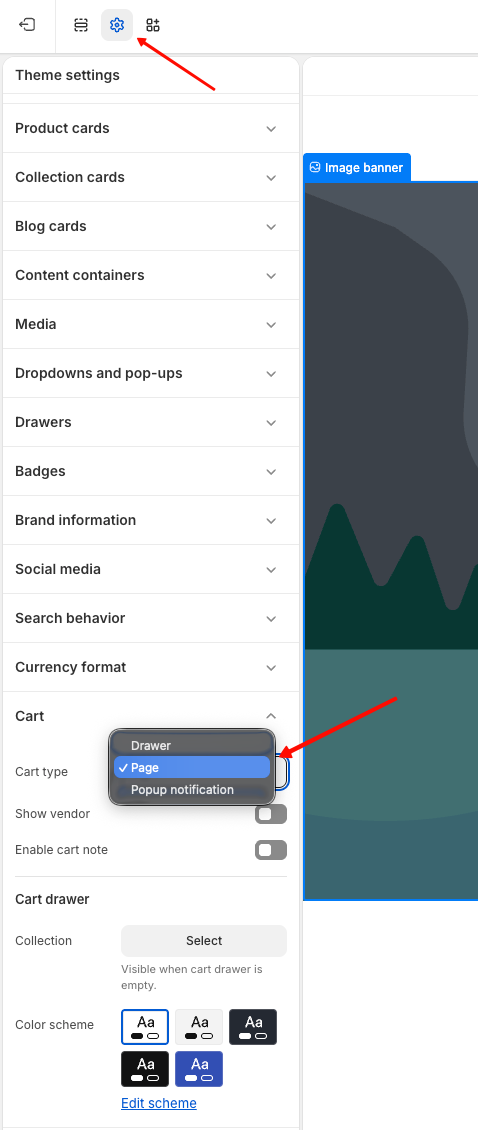
The names of the settings depend on your theme. Look for a cart setting such as Cart type in Theme settings, and choose the cart page option.
If it still shows
Some themes have no setting to turn off their cart drawer. Contact us through the in-app chat, and we set up the XBoost cart drawer for your theme.